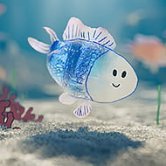








You sketch a lopsided fish with a crooked tail, drop it into the tank, and watch it swim off exactly as badly drawn as you made it. That moment is why Drawquarium sticks with people: the fish is yours, flaws included, and it behaves like a real resident of the aquarium. There is no score and no clock, only a small tank that slowly fills with things you made.
| Genre | Cozy sandbox aquarium |
| Platform | PC on Steam, playable on Steam Deck |
| Core action | Draw or import fish, plants, and props |
| Long-term goal | Raise fish until they turn golden |
Drawing Your First Fish in Drawquarium
The paint tool is the center of everything. You draw a fish, a plant, or a prop in the in-game editor, or you import a PNG from another drawing app, and the result drops into the aquarium as a living resident. A handful of ready-made fish are included for players who want to start with the tank, but most people end up drawing their own within the first session. The game does not grade your skill, so a shaky stick fish is as welcome as a polished one.
Beginners tend to overthink the first drawing. A better habit is to draw something small and silly, see how it swims, and refine from there, since a clear silhouette tends to read better in motion than a crowded one.
The editor is not limited to fish. Jellyfish, submarines, and even skyscrapers have found their way into tanks, because the sandbox favors imagination over realism.
Feeding and Raising Golden Fish
Feeding: You can paint the food your fish eat, a small touch that makes feeding time feel personal instead of mechanical. Well-fed fish grow over time, and a steady routine matters more than speed because the payoff arrives slowly.
Metallic shimmer: If you feed your fish well, they gain a metallic shimmer as they age, and the long-term goal is a golden fish. Spotting the first glint on a fish you drew yourself is one of those moments only players seem to talk about, because it feels earned in a sandbox with no combat and no timer. Artists who drew their fish with care often find this the most rewarding part.
Golden fish scales: Golden fish scales are the currency that unlocks new decor and tools, so raising healthy fish feeds directly into how your tank looks. Birthdays add a little ceremony along the way, and early on, before you unlock much decoration, the scales are the thing everyone wants to collect.
Desktop Wallpaper and Tank Decor in Drawquarium
As you progress you unlock more ways to dress the tank: sand color, driftwood, custom lighting, and a hand-drawn castle home for your fish. You can also draw plants and props yourself, so the decor does not have to come from a menu. Wallpaper mode lets you set the aquarium as your desktop background, which suits anyone who wants a quiet tank behind their work windows.
Artists who already use another drawing app can import a PNG instead of working in the built-in editor, so a detailed piece made elsewhere can become a fish or a prop. That answers a common question: you do not have to draw inside the paint tool to get your art into the tank.
Steam Deck players can draw with the touchpad or touchscreen, which makes the editor feel natural on handheld. Once the tank gets busy with fish, plants, and props, expect frame drops, and the longer you play the more that matters.
What Players Debate About Drawquarium
Drawquarium is a sandbox, and sandboxes divide people. Some players love the absence of failure and treat the tank as a calm space, while others want clearer goals than collecting golden fish scales and unlocking decor. If you need a win condition, you will have to set your own, and by the time you own the castle the open-ended nature is either the point or the problem.
Quality is the other talking point. Fans celebrate janky fish, since a crooked drawing gliding with total confidence is half the charm, and the hand-drawn spirit is a big reason the trailer hit people emotionally. At the same time, busy tanks can strain handheld hardware, and that trade-off is worth knowing about before you fill every corner.
A demo is available on Steam, which gives you a way to test the paint tool and wallpaper mode before committing. Players who mainly want a desktop companion usually decide within a few minutes.
Drawquarium rewards patience more than drawing talent. Feed the fish you drew on your first day, wait for the metallic shimmer, and spend your golden fish scales on the hand-drawn castle and the lighting that makes the tank feel like yours. If you want a calm place that quietly fills with your own odd creations, the game delivers exactly that.